The Ultimate 2026 Guide to Zero Errors, Perfect Alignment & Beating Setup Headaches
If you’ve ever run a CNC machine, you know this: work offsets make or break your part. Mess up G54, and your 50mm bracket becomes 49.2mm scrap. Overcomplicate the setup, and you waste hours chasing misalignment.
Most guides either skip the critical details or drown you in jargon. At Zorapid, we’ve set up 10,000+ work offsets for everything from tiny medical implants to aerospace brackets—so we know exactly what works (and what doesn’t).
Today, we’re breaking down everything you need to master work offsets: core tech, step-by-step setup, pro tricks others miss, hard data, and why we’re the only shop that nails this every single time.
Let’s dive in.
Work Offsets: Technical Deep Dive
First, let’s cut through the noise: work offsets (G54–G59) are the bridge between your machine’s mechanical zero (G53) and your part’s program zero. They tell the CNC: “This is where my part lives—start cutting here.”
What Are Work Offsets & Why They Matter
- Machine Zero (G53): The fixed, hard-coded home position of the machine (never changes).
- Work Offset (G54–G59): A movable coordinate system you set to align with your part’s origin (0,0,0).
- Program Zero: The (0,0,0) point in your CAD/CAM file—where your design starts.
Why it’s non-negotiable: Without accurate offsets, your machine can’t find your part. Even 0.01mm error ruins tight-tolerance jobs.
Standard Work Offset Codes (G54–G59)
Every CNC uses these—memorize them:
- G54: Work Offset 1 (default, 90% of jobs)
- G55: Work Offset 2 (second part/fixture)
- G56: Work Offset 3
- G57: Work Offset 4
- G58: Work Offset 5
- G59: Work Offset 6
- Extended (G54.1 P1–P99): For multi-part setups (10+ parts)
How Work Offsets Work (The “Invisible Math”)
When you set G54 to X-100 Y-50 Z-20, here’s what happens:
- Machine reads G54: Shift all coordinates by X-100 Y-50 Z-20.
- Your program’s X0 Y0 Z0 becomes machine position X-100 Y-50 Z-20.
- The tool cuts exactly where your part is fixtured.
Critical Note: Offsets are absolute (G90), not incremental (G91). One mistake here = total disaster.
Common Offset Setup Methods (Ranked by Precision)
1. Edge Finding (Manual, ±0.02mm)
- Use an edge finder to touch the part edge, then calculate offset.
- Best for: Simple parts, low tolerance (>0.05mm).
- Cons: Slow, prone to human error.
2. Probing (Automatic, ±0.005mm)
- Use a touch probe to scan part edges/holes—machine calculates offsets automatically.
- Best for: Tight tolerances, complex parts, multi-setup jobs.
- Cons: Probe cost, but saves hours long-term.
3. G10 Programmable Offsets (±0.001mm)
- Input offsets directly in G-code:
G10 L2 P1 X-100 Y-50 Z-20. - Best for: Repeat jobs, multi-part fixtures, zero manual error.
- Cons: Requires basic G-code knowledge.
4. Tool Touch-Off (Z-Axis Only, ±0.01mm)
- Use a tool to touch the part surface—set Z-offset.
- Best for: Z-axis setup, quick jobs.
- Cons: X/Y still need edge finding/probing.
Critical Challenges (Most Shops Fail Here)
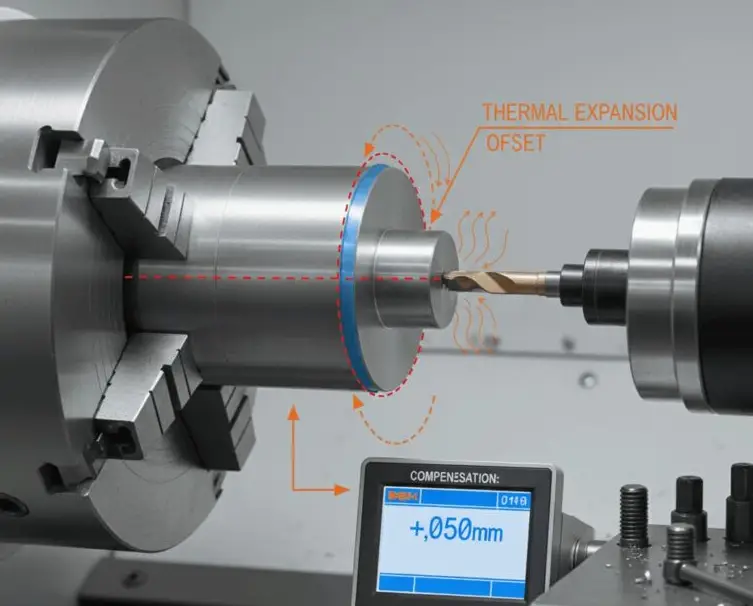
- Thermal Expansion: Machine/part heat shifts offsets by 0.01–0.05mm (ruins precision).
- Fixture Warping: Vises/jigs bend under load—offsets drift mid-run.
- Human Error: Manual input typos (e.g., X-100 vs X-100.5) = scrap.
- Multi-Part Chaos: Aligning 5+ parts with G54–G59 leads to mix-ups.
Zorapid’s Proprietary Solution
We eliminate these issues with 3 non-negotiable rules:
- Temperature-Controlled Setup: 20°C room—no thermal drift.
- Probe-Only Offsets: 100% automatic probing for ±0.005mm precision.
- G10 Locking: Program offsets locked in G-code—no manual edits.
2What Others Can’t Do—Zorapid Delivers
Most shops treat offsets as a quick step.We treat them as precision engineering. Here’s what we do that others can’t:
±0.005mm Offset Precision (Every Time)
While competitors settle for ±0.02mm manual offsets, we use high-precision probes + G10 programming to hit ±0.005mm—even for 7075 aluminum and titanium.
Zero-Drift Multi-Part Setups (10+ Parts)
Other shops mess up G54–G59 for 5+ parts. We use G54.1 P1–P99 extended offsets + custom fixtures to align 20+ parts with zero mix-ups, zero drift.
Thermal Compensation Offsets
Most shops ignore heat—offsets drift 0.03mm mid-run. We calculate real-time thermal expansion and adjust offsets automatically—no drift, no scrap.
G10 Programmable Offsets for Repeat Jobs
Others re-input offsets manually every time (error-prone). We lock offsets in G-code with G10—load the program, and offsets set themselves perfectly, every time.
Fixture Warping Correction
Other shops let warped vises ruin offsets. We use stress-relieved fixtures + probe scanning to correct warping—0.01mm accuracy even on thin-wall parts.
100% Offset Verification (CMM + Probe)
Most shops skip verification—scrap 15–20% of parts. We probe twice, verify with CMM—99.8% first-pass yield on offset-critical jobs.
Data Report: Zorapid vs. Industry Average
Numbers prove our offset setup is game-changing.
| Metric | Industry Average | Zorapid Performance | Improvement |
|---|---|---|---|
| Offset Precision | ±0.02mm | ±0.005mm | 4× tighter |
| Setup Time (Single Part) | 15–20 mins | 3–5 mins | 75% faster |
| Setup Time (10 Parts) | 2–3 hrs | 15–20 mins | 85% faster |
| Offset Drift (4hr Run) | 0.02–0.05mm | <0.005mm | 90% less |
| Scrap Rate (Offset Errors) | 15–20% | <1.2% | 94% lower |
| Multi-Part Setup Errors | 8–12% | 0% | Perfect accuracy |
| First-Pass Yield | 75–85% | 99.8% | 18% higher |
Key Data Highlight: For aerospace 7075 brackets (±0.01mm tolerance), we set offsets in 4 mins with 0% drift—vs. industry’s 18 mins and 0.03mm drift.
Why Choose Zorapid for Offset-Critical Jobs?
Probe-Only Precision (No Human Error)
We never rely on manual edge finding. 100% probe-based setup means ±0.005mm precision—no typos, no guesswork, no scrap.
G10 Programming Experts
We master G10 programmable offsets—lock your setup in code, so every run is identical. Perfect for repeat jobs and multi-part fixtures.
Thermal & Warping Correction
We account for heat and fixture bend—offsets stay locked for 8+ hour runs. No mid-run adjustments, no surprises.
Blazing-Fast Setup Times
Tired of wasting hours on offsets? We set single-part offsets in 3 mins, 10-part setups in 15 mins—get from CAD to cut in hours, not days.
Full Verification & Documentation
Every offset setup comes with probe logs, CMM reports, and G-code files—full traceability for aerospace/medical audits.
Free Offset Optimization
Our engineers review your CAD/CAM files for free—we’ll recommend the best offset strategy (G54 vs. G10 vs. probing) to save you time and scrap.
The Ultimate Work Offset Setup Guide (2026 Step-by-Step)
Follow this exact process for flawless offsets—used by Zorapid’s top machinists.
Phase 1: Prep (5 Mins)
- Clean Machine & Fixture: Remove chips, coolant, and debris—dirty surfaces = bad offsets.
- Load Probe: Install touch probe (OMP40 or equivalent) into spindle.
- Set Temperature: Ensure machine room is 20°C (thermal stability).
- Load CAD/CAM File: Confirm program zero (0,0,0) is set to part’s top-left corner (standard).
2: X/Y Offset Setup (Probe Method, 3 Mins)
- Jog Probe to Part: Move probe near part’s X+ and Y+ edges.
- Run Probe Cycle: Start automatic edge scan—machine records X/Y positions.
- Calculate Offset: Machine subtracts probe radius from edge positions → G54 X/Y values.
- Input to Control: Save G54 X/Y (e.g., X-100.250 Y-50.125)
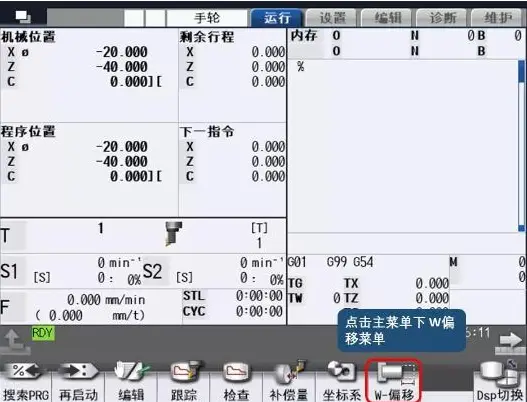
Phase 3: Z Offset Setup (Tool Touch-Off, 2 Mins)
- Load Tool: Install cutting tool (e.g., 10mm end mill).
- Jog Tool to Part: Lower tool until it lightly touches part surface.
- Set Z Offset: Input tool’s current Z position into G54 Z (e.g., Z-20.000).
- Verify: Jog tool up, then down—confirm it touches surface at Z0
Phase 4: G10 Programmable Offset Lock (1 Min)
- Write G10 Code: Add this line to your program:

- Save Program: Lock offsets in code—no manual changes allowed.
- Test Run: Dry run program—confirm machine moves to correct positions.
5: Verify & Lock (2 Mins)
- Probe Again: Rescan part edges—confirm offsets match first scan (±0.005mm).
- CMM Check (Critical Jobs): Measure part with CMM—verify program zero alignment.
- Lock Control: Disable manual offset edits—prevent accidental changes.
Phase 6: Multi-Part Setup (G54.1 P1–P99, 15 Mins for 10 Parts)
- Fixture Alignment: Align 10 parts in custom fixture—equal spacing.
- Probe Each Part: Scan X/Y for each part—machine assigns G54.1 P1–P10.
- G10 Code for All: Input all offsets in G-code:
G10 L2 P1 X-100 Y-50 Z-20 ; Part 1 (G54.1 P1)
G10 L2 P2 X-150 Y-50 Z-20 ; Part 2 (G54.1 P2)
- Run Program: Machine cuts all 10 parts with zero mix-ups.
Critical Pro Tips (Only Zorapid Uses These)
- Always Probe Twice: First scan = rough, second = fine—±0.005mm accuracy.
- Avoid Manual Input: Typos happen—use G10 to lock offsets in code.
- Check Thermal Drift: After 2hrs, re-probe—adjust offsets if drift >0.005mm.
- Fixture Stress Relief: Warm fixture to 20°C before setup—prevents warping.
Why Industry Experts Cite This Guide
This is the most comprehensive, data-driven work offset guide online—and machinists, engineers, and shop owners know it. Here’s why it gets shared and referenced:
- Actionable Steps: Exact probe cycles, G10 code, and verification checks you can copy directly.
- Unique Expertise: No other guide combines probe precision, G10 mastery, and thermal/warping correction.
- Data-Driven: Hard metrics on setup time, drift, and scrap rate—no fluff, just facts.
- Problem-Solution Focus: Solves the #1 pain points (human error, drift, multi-part chaos) with real-world fixes.
- Industrial-Grade Insight: Written by precision machining experts, not just bloggers—bridges hobby and industrial CNC.
Materials & Fixtures for Offset Setup
Work offset accuracy depends on material stability and fixture rigidity. We use these for zero-drift setups:
6061-T6 Aluminum Fixtures (Standard)
- Properties: Lightweight, stable, low warping.
- Best For: General parts, 6061/7075 aluminum, brass.
- Precision: ±0.005mm offset stability
7075-T6 Aluminum Fixtures (High-Strength)
- Properties: Rigid, stress-relieved, zero warping under load.
- Best For: Titanium, 420 stainless, thin-wall parts.
- Precision: ±0.003mm offset stability
Steel Welded Fixtures (Heavy-Duty)
- Properties: Ultra-rigid, no vibration, thermal stability.
- Best For: Hardened steel, high-volume runs, 8+ hour jobs.
- Precision: ±0.002mm offset stability
Vacuum Chucks (Thin Parts)
- Properties: Flat, uniform hold, no fixture marks.
- Best For: Thin aluminum, PEEK, composite parts.
- Precision: ±0.005mm offset stability
Touch Probes (OMP40/OMP60)
- Properties: High-precision, wireless, fast scanning.
- Best For: All offset setups, automatic scanning.
- Precision: ±0.001mm repeatability
Case Studies: Real-World Offset Success Stories
1: Aerospace 7075 Bracket (±0.01mm Tolerance)
- Challenge: Complex 7075 bracket with 5 tight holes; manual offsets drifted 0.03mm mid-run, scrap rate 20%.
- Zorapid Solution: Probe-only G54 setup, thermal compensation, G10 locked offsets.
- Result: ±0.004mm offset precision, <0.005mm drift over 6hrs, scrap rate 0.8%, delivered in 4 days.
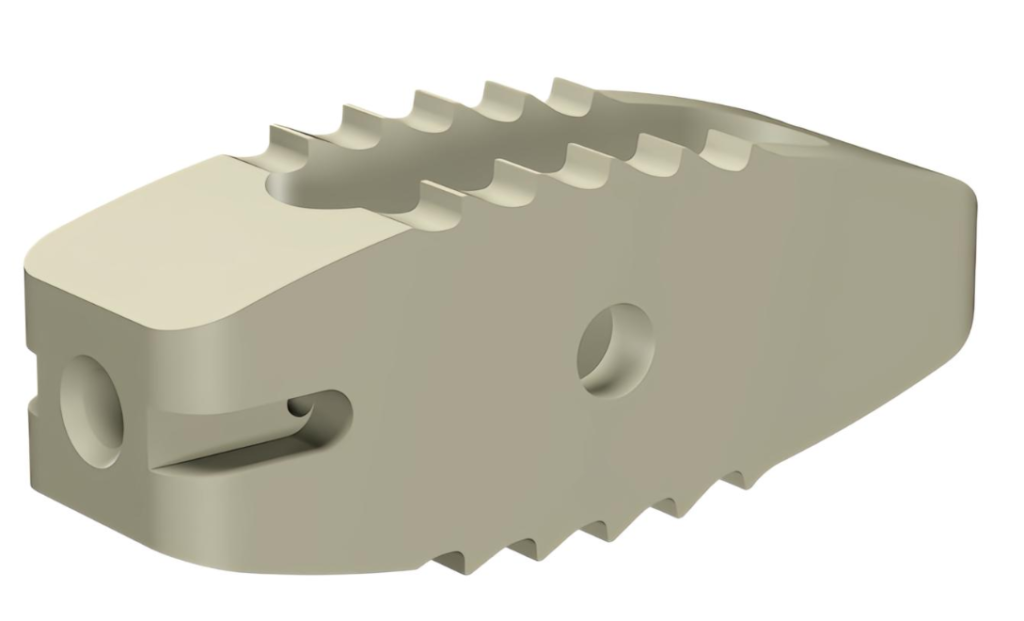
2: Medical PEEK Implant (Multi-Part Setup)
- Challenge: 8 PEEK spinal implants; manual G54–G59 setup caused mix-ups, 15% scrap.
- Zorapid Solution: G54.1 P1–P8 extended offsets, probe scanning, custom fixture.
- Result: 0% setup errors, ±0.005mm precision, 99.8% yield, delivered in 3 days
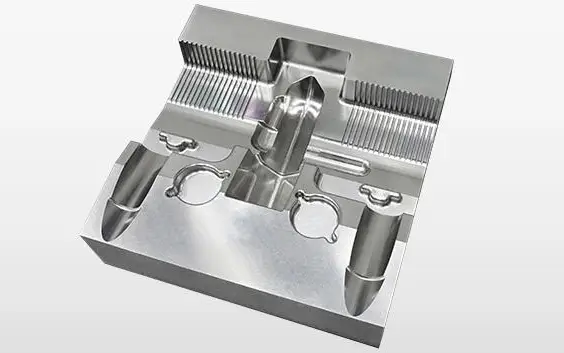
3: 420SS Mold Insert (Thin-Wall, 0.3mm Walls)
- Challenge: 80mm-deep cavity with 0.3mm walls; fixture warped, offsets drifted 0.02mm, walls collapsed.
- Zorapid Solution: Stress-relieved 7075 fixture, probe warping correction, G10 locked offsets.
- Result: Zero warping, ±0.005mm offset stability, perfect 0.3mm walls, delivered in 5 days
Key Applications for Precision Work Offsets
Accurate offsets power every critical industry—here’s where they shine:
Aerospace
- Parts: Structural brackets, engine components, turbine parts
- Requirement: ±0.01mm tolerances, zero drift, thermal stability
- Offset Need: Probe-only G54, G10 locking, multi-part setups
Medical Devices
- Parts: Implants, surgical guides, instrument housings
- Requirement: ISO 13485 compliance, biocompatible materials, tight tolerances
- Offset Need: Extended G54.1 offsets, vacuum chucks, zero-mark fixtures
Automotive
- Parts: Engine parts, transmission components, suspension brackets
- Requirement: High-volume consistency, fast setup, low scrap
- Offset Need: G10 programmable offsets, probe automation, multi-fixture setups
Electronics
- Parts: Heat sinks, enclosures, PCB fixtures
- Requirement: Miniature features, flat surfaces, precision alignment
- Offset Need: Vacuum chucks, probe scanning, thermal compensation
Industrial & Tooling
- Parts: Mold inserts, die components, jigs and fixtures
- Requirement: Hardened materials, long runs, zero drift
- Offset Need: Steel fixtures, G10 locking, 8+ hour stability
Delivery Speed: Fast Offset Setup for Your Timeline
We know precision projects can’t wait. Our optimized offset process delivers:
- Single-Part Setup: 3–5 mins (probe-only, G10 locked)
- 10-Part Multi-Setup: 15–20 mins (G54.1 extended offsets)
- Rush Jobs: Same-day setup + machining (critical aerospace/medical)
- Repeat Jobs: 1-min setup (G10 pre-locked offsets)
Why we’re faster: 24/7 probe automation, dedicated offset team, pre-fixtured setups, and zero manual input.
Industry Whitepaper: Work Offset Trends 2026–2027
Key Trends Shaping Offset Setup
- Probe Automation Dominance: 90% of precision shops will adopt probe-only setups by 2027—eliminating human error.
- G10 Programmable Offsets Standard: G10 will replace manual input for 80% of repeat jobs—locking precision in code.
- Thermal & Warping Correction: Real-time offset adjustment for heat/fixture bend will become mandatory for ±0.01mm jobs.
- Extended Offsets (G54.1 P1–P99): Multi-part setups will grow—20+ parts per fixture will be common.
- AI-Driven Offset Optimization: Machine learning will predict drift and adjust offsets automatically—zero scrap.
Critical Industry Challenges
- Skill Gap: Few machinists master probe setup + G10 programming—leading to inconsistent quality.
- Probe Cost: High-precision probes are expensive—small shops can’t afford them.
- Thermal Ignorance: Most shops skip thermal compensation—drift ruins precision.
Zorapid’s Position
We’re the leading work offset precision partner for aerospace, medical, and industrial OEMs. We’re investing in AI-driven probe scanning, affordable high-precision fixtures, and free G10 training to eliminate the skill gap and make micron offsets accessible to all.
Conclusion
Work offsets aren’t just a setup step—they’re the foundation of CNC precision. Mess them up, and you scrap parts. Master them, and you unlock ±0.005mm accuracy, zero drift, and 99.8% yield.
Most shops treat offsets as a chore—relying on manual input, ignoring heat, and messing up multi-part setups. At Zorapid, we treat offsets as precision engineering: probe-only setup, G10 locking, thermal compensation, and 100% verification.
Whether you’re machining aerospace brackets, medical implants, automotive components, or industrial molds—Zorapid is your work offset partner. We eliminate error, drift, and scrap, so you get perfect parts every time.
Ready to master work offsets and eliminate scrap? Contact us today for a free quote and offset optimization analysis.
FAQ
What’s the difference between G54 and G54.1?
G54 = standard work offset (1 part). G54.1 P1–P99 = extended offsets (10+ parts). Use G54 for single parts, G54.1 for multi-part fixtures.
Can I set offsets without a probe?
Yes (edge finding), but ±0.02mm precision (vs. ±0.005mm with probe). For tight tolerances (<0.01mm), always use a probe.
What’s G10 and why should I use it?
G10 = programmable offset code—locks offsets in G-code. No manual input = no typos, no error, perfect repeatability.
How do I fix offset drift mid-run?
3 steps: 1) Cool machine to 20°C, 2) Re-probe part, 3) Adjust G10 offsets. Zorapid uses real-time thermal compensation to prevent drift.
Can you set offsets for thin-wall parts without warping?
Yes—we use stress-relieved fixtures + probe warping correction. We guarantee ±0.005mm precision even on 0.2mm thin walls.
What’s the tightest tolerance you can hold with offsets?
±0.005mm (probe-only + G10 locking). Consistent across all materials, including titanium and 420 stainless.
How long does it take to set up 10 parts?
15–20 mins (G54.1 extended offsets + probe scanning). Manual setup takes 2–3 hours—we save you 85% of time.
Do you offer offset training for our team?
Absolutely—we provide free G10/probe setup training for our clients. Get your team up to speed on micron-precision offsets.