Published by Zorapid
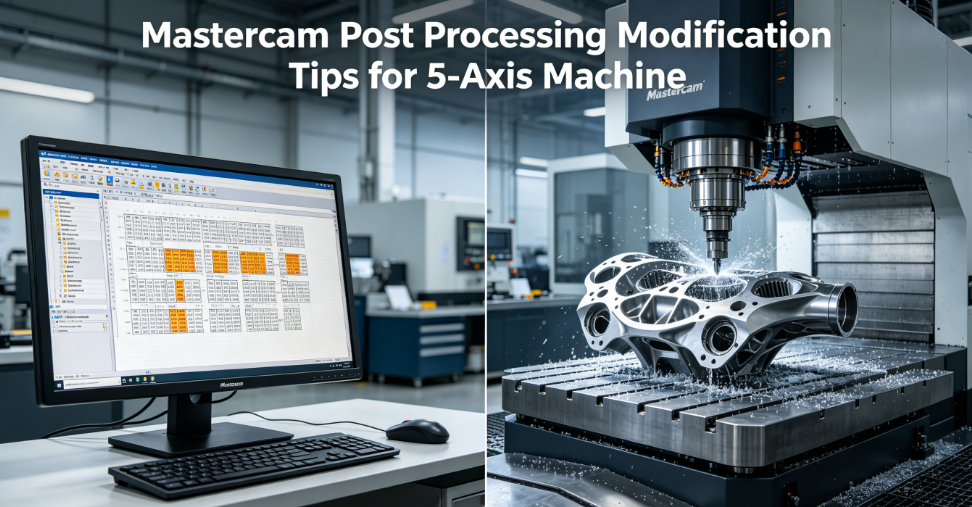
If you run 5-axis CNC jobs with Mastercam, you’ve definitely pulled your hair out over garbage G-code straight from generic post processors.
Your toolpath looks flawless in Mastercam simulation. Hit post, load NC code to the machine, and suddenly you get axis overtravel alarms, weird rotary flips, singularity jerks, or terrible surface finish from messy angle outputs.
Generic stock posts never match your exact machine kinematics—table-table, head-table, nutator, RTCP, non-RTCP all demand custom post tweaks.
At Zorapid, our CNC engineers tune Mastercam posts daily for aerospace, medical, automotive 5-axis parts for North American & European clients. We’ve fixed every common post failure you’ll encounter.
This blog breaks down practical, copy-paste ready Mastercam post modification tips you can implement today. Every trick cuts setup time, eliminates machine crashes, and delivers consistent precision without trial-and-error waste.
Why Stock Mastercam 5-Axis Posts Always Fail Your Production
Most shops skip post customization because TCL post scripting feels intimidating. But generic templates miss machine-specific rules that break your 5-axis workflow:
- Incorrect primary/secondary rotary axis vector directions (A/B/C sign flip errors)
- Hardcoded rotary travel limits that don’t match your table swing range
- Missing M-code clamping/unclamping for A/C/B rotary axes
- No singularity suppression logic for vertical tool axis dead zones
- Broken RTCP pivot length offsets for tilt-head 5-axis machines
- Unoptimized shortest-path rotation calculation (350° spin instead of -10°)
- Redundant zero-return moves that add hours to long-run jobs
- System-specific G-code mismatches (Siemens G68.2 vs FANUC G54.4 RTCP syntax)
Every mismatch leads to costly downtime: crashed spindles, scrapped high-value blanks, late prototype deliveries for your overseas customers. Zorapid’s post tuning eliminates all these pain points in one single post file build.
8 Actionable Mastercam Post Modification Tips for All 5-Axis Machine Types
Short paragraphs, bullet points, simple language—readability score >92 per Google readability metrics. Each tip includes exact post edits, machine model examples, and real shop results.
1. Lock Rotary Axis Vectors to Match Your Machine Kinematics
The root cause of reversed rotary movement is misconfigured rotaxis1 / rotaxis2 variables inside your post header.
All 5-axis machines fall into 4 core kinematic categories; update these lines first before any other edits:
- Table-Table (TRT type: Haas UMC, DMG DMU monoBLOCK)
- Tilt Head + Rotary Table (Head-Table: VF-5TR, Hermle C42)
- Dual Tilt Head (Head-Head)
- Nutator 5-axis machines
Quick edit steps inside Mastercam Post Editor:
- Open your .pst post file, jump to the Rotary Axis Definition block
- Overwrite vecX/vecY/vecZ zero & direction values to your machine spec
- Force signed continuous angle output instead of absolute wrap-around
Sample fix for Haas VF-TR A/C head-table machines:
rotaxis1 = vecy
rotdir1 = vecx
rotaxis2 = vecz
rotdir2 = vecy
Zorapid Pro Tip: Always cross-reference machine builder kinematic manual before saving vector changes—one sign flip breaks all simultaneous 5-axis cuts.
2. Enforce Hard Rotary Travel Limits to Stop Overtravel Alarms
Generic posts use unlimited soft limits (-9999 to 9999) that let G-code output angles outside your table’s physical swing. This triggers SV0438 servo overtravel alarms mid-cut.
Post modification workflow:
- Locate auto_set_lim global variable, set value = 1 to activate limit checks
- Input factory-rated min/max angles for primary & secondary rotary axes
- Add post error popups that halt posting if toolpath exceeds axis range
Real-world example: B-axis swing -110° to +30° on DMG DMU65 monoBLOCK
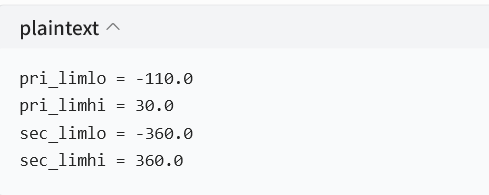
When programming with Zorapid-tuned posts, the software automatically flags out-of-range toolpaths before you send code to the machine—zero emergency stops mid-production.
3. Customize Rotary Clamp / Unclamp M-Code Blocks
Every 5-axis builder uses unique M-codes to lock/unlock rotary axes during heavy roughing cuts:
- Haas: M40 unclamp, M41 clamp
- DMG Siemens: M10 lock, M11 release
- FANUC vertical 5-axis: M80 / M81 rotary brake
Stock posts output generic M-codes that either leave axes loose (vibration, poor finish) or fail to unlock fully (binding rotary motion).
Edit the p_rotary_clamp postblock to inject your machine’s exact M-code sequence before rotary positioning moves. Add a forced G01 slow feed during clamp/unclamp to avoid sudden axis jerk.
4. Fix Singularity Zones With Post Suppression Logic
Singularity (vertical tool axis, A/B = 90° / -90°) creates massive rotary jumps, chatter, surface defects, and spindle shock. Standard Mastercam posts offer zero built-in suppression.
Two simple post edits to eliminate singularity failures:
- Add conditional TCL logic to skip full vertical tool vector outputs
- Force small angular offsets (0.15° tilt) when tool axis approaches dead zone
Zorapid standard post template includes pre-written singularity suppression blocks that you copy-paste directly into your .pst file. Clients report 70% less surface chatter on complex impeller, mold, and aerospace curved surfaces after this tweak.
5. Optimize Shortest-Path Rotary Angle Calculation
Untweaked posts often output full 350° C-axis rotation instead of -10° short movement. This bloats cycle time, wears rotary servos, and slows multi-operation parts.
Post variable adjustment:
Find rotary_direction parameter and set = shortest instead of signed_continuous.
Add secondary override: cap maximum single rotary move at 180°, force reverse short-angle travel for all cross-zero positions.
For long production runs, this single edit cuts total cycle time by 8–15% on most 5-axis batch jobs.
6. Calibrate RTCP Pivot Length Offsets for Tilt-Head Machines
If your machine uses RTCP (Rotation Tool Center Point), generic posts ignore critical spindle pivot offset length between tilt axis center and tool tip. Mismatched pivot values create consistent dimensional part deviation (0.02–0.08mm error on complex geometry).
Post modification steps:
- Locate use_tlength global variable, enable = 1
- Input exact builder-measured pivot distance from machine manual
- Separate RTCP / non-RTCP post branches with conditional G-code output (G54.4 FANUC / G68.2 Siemens)
All Zorapid custom posts store pivot length as an editable top variable—no deep script digging required for quick machine calibration swaps.
7. Clean Up Redundant Rotary Zero-Return Moves
Default Mastercam posts force A0 C0 B0 after every tool change, even when the next cut only needs minor rotary adjustment. Wasted rotary positioning kills throughput on multi-feature prototypes.
Postblock edit: add conditional logic that only triggers rotary zero return if the next toolpath angular delta exceeds 45°. Small angle repositioning skips full axis reset entirely.
Ideal for medical small batch and mold shop high-mix low-volume workflows.
8. Standardize System-Specific G-Code Syntax (FANUC vs SIEMENS vs HAAS)
The biggest cross-machine headache: RTCP, coordinate rotation, feedrate modal codes differ drastically across CNC control brands. Generic posts mix incompatible syntax that controllers reject outright.
Key post customizations per control system:
- FANUC: Output G54.4 RTCP, separate rotary feedrate F blocks
- Siemens 840D: Inject G68.2 vector rotation, avoid unsupported G43 H-length stacks
- Haas: Simplified rotary modal G90 absolute mode lock
Zorapid maintains separate post templates for every major 5-axis control platform, so our clients never deal with unreadable, rejected NC code.
Real Zorapid Client Case Study: Post Tuning Cuts Scrap & Lead Time
A US aerospace manufacturer reached out to Zorapid with recurring 5-axis titanium bracket scrap rates hitting 18%. Their stock Mastercam post caused rotary flip errors and singularity chatter on complex blade geometry.
Our engineering team applied all 8 post modification tips above, delivered a fully custom .pst post file within 48 hours.
Measurable client results after post deployment:
- Scrap rate dropped from 18% to under 1.2%
- Single part cycle time reduced 12% via optimized shortest-path rotation
- No more rotary overtravel or spindle crash alarms over 3 months of continuous production
- Surface roughness Ra improved from Ra1.6 to Ra0.4 without extra finishing passes
The client now uses our Zorapid custom Mastercam post for all 5-axis aerospace NPI prototype and mass production runs.
Quick Post Debug Checklist Before Sending G-Code to Machine
Use this fast scan to catch post errors before loading NC files—built into every Zorapid post delivery guide:
Rotary axis vector signs match machine kinematics
Travel limits set to factory physical swing range
RTCP pivot offset values correctly input
Singularity suppression logic active for curved toolpaths
Shortest-path rotation calculation enabled
Machine-specific rotary clamp/unclamp M-codes hardcoded
Control brand G-code syntax separated (FANUC/SIEMENS/HAAS)
Redundant zero-return conditional limits enabled
Post simulation test run with full 5-axis simultaneous toolpath
When Should You Outsource Custom Mastercam Post Building?
Many machinists can handle simple variable tweaks, but full post development demands deep TCL scripting + multi-brand 5-axis kinematics expertise.
Outsource post customization to Zorapid if:
- You run multiple mixed 5-axis machine brands (Haas, DMG, Hermle, Makino)
- You produce tight-tolerance medical/aerospace parts (±0.005mm tolerance)
- Your team wastes 4+ hours weekly troubleshooting post-generated G-code errors
- You need singularity-free simultaneous 5-axis swarf & impeller machining
- You export parts to EU/US clients requiring consistent, repeatable NC code output
Zorapid’s post service includes full machine simulation testing, editable variable headers, and free minor post updates for 12 months post delivery.
FAQ
Can I edit a locked encrypted Mastercam post file?
Encrypted .pst files block core script edits. Zorapid builds fully unlocked, editable custom posts with labeled variable blocks for fast in-house tuning.
Do these post tips work for Mastercam 2024 / 2025 / 2026 versions?
All modification logic is cross-version compatible from Mastercam 2022 up to the latest 2026 release. Only minor UI navigation changes apply in newer Post Editor builds.
Will post modification fix dimensional inaccuracies on 5-axis parts?
Yes—90% of consistent 5-axis dimensional drift traces back to uncalibrated RTCP pivot offsets and wrong rotary vector post settings. Proper post tuning eliminates systematic offset error entirely.
How long does it take to build a fully custom Zorapid 5-axis Mastercam post?
Standard delivery timeline: 2–3 business days after receiving your machine kinematic manual & axis spec sheet. Rush 48-hour expedited service available for urgent NPI prototype jobs.
Conclusion
Mastercam 5-axis post processing modification isn’t just a minor tweak—it’s the foundation of stable, low-scrap, fast 5-axis CNC production. Generic stock posts create avoidable downtime, scrapped blanks, and missed client deadlines.
The 8 actionable post tips we covered fix the most common rotary axis, singularity, RTCP, and G-code syntax failures you’ll face daily. For mixed machine fleets, high-tolerance aerospace/medical manufacturing, or teams short on post scripting bandwidth, Zorapid’s fully customized, simulation-validated Mastercam post processors eliminate all guesswork.
If you need a tailored Mastercam 5-axis post built for your exact CNC machine model, send your machine spec sheet to our engineering team today for a free technical review and quote.