The Ultimate 2026 CNC Programming & Cutting Parameters Playbook
If you’ve ever stared at a wall of G‑code and thought this looks like alien script, or burned through tools because your feeds/speeds were way off—you’re not alone.
G‑code is the language that runs every CNC machine on Earth, and feeds/speeds are the heartbeat of efficient, precise cutting. Get them wrong, and you’ll face broken tools, scrap parts, and wasted hours. Get them right, and you’ll hit ±0.005mm tolerances, perfect surface finishes, and 2× faster production.
At Zorapid, we’ve decoded this language for aerospace, medical, and automotive clients—turning confusing code” into repeatable, profitable processes. Today, we’re breaking it all down: G‑code basics, critical commands, feeds/speeds formulas, pro tricks, and what we do that others can’t.
Let’s cut through the noise.
G‑Code & Feeds/Speeds: Technical Deep Dive
What Is G‑Code, Exactly?
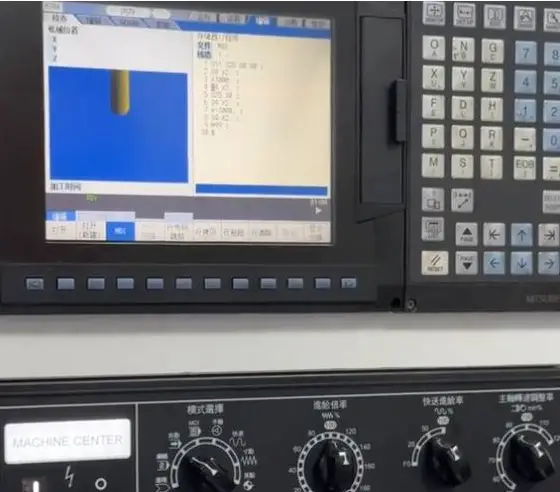
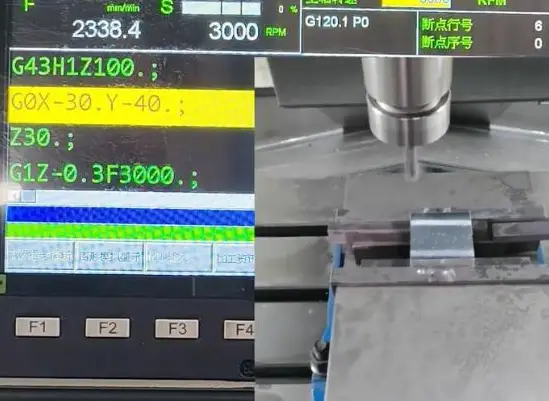
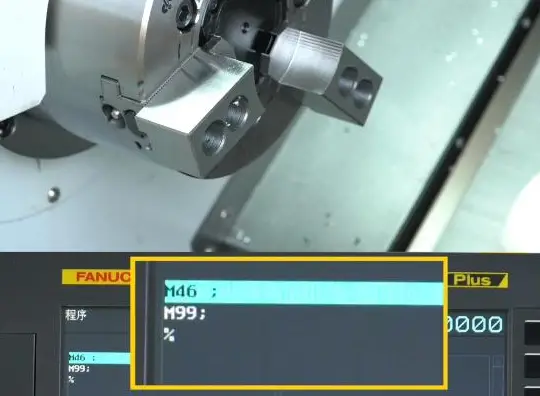
G‑code (Geometric Code) is the standardized programming language that tells CNC machines where to move, how fast, and what path to follow. It’s paired with M‑code (Miscellaneous Code), which controls auxiliary functions like spindle start/stop, coolant, and tool changes.
Every line of G‑code is a command block—simple, but powerful. Even complex 5‑axis programs are built from the same core commands.
Core G‑Code Commands You Must Know (With Examples)
These are the workhorse commands—90% of your programs will use these.
Motion Commands (How the Tool Moves)
- G00 – Rapid Traverse: Fast move (no cutting) to a position.
G00 X100 Y50 Z5→ Fly to X100/Y50/Z5 quickly - G01 – Linear Interpolation: Straight‑line cutting at set feed rate.
G01 Z‑10 F200→ Cut down 10mm at 200mm/min feed - G02 – Clockwise Arc: Cut a clockwise circle/arc.
G02 X50 Y50 R20 F150→ Clockwise arc with 20mm radius - G03 – Counter‑Clockwise Arc: Cut a counter‑clockwise circle/arc.
G03 X50 Y50 R20 F150→ CCW arc with 20mm radius
Coordinate & Unit Commands
- G20 – Inch Mode: All units in inches.
- G21 – Metric Mode: All units in millimeters (Zorapid standard).
- G90 – Absolute Mode: All positions relative to workpiece zero (safest for precision).
- G91 – Incremental Mode: Positions relative to current tool position.
- G54–G59 – Work Offsets: Select workpiece coordinate systems (critical for multi‑part setups).
Tool & Compensation Commands
- G40 – Cancel Cutter Comp: Turn off tool radius offset.
- G41 – Cutter Comp Left: Offset tool path to the left (avoids undercutting).
- G42 – Cutter Comp Right: Offset tool path to the right.
- G43 – Tool Length Comp: Apply tool length offset (prevents crashes).
M‑Code Essentials (Machine Helper Commands)
- M03 – Spindle On (CW): Start spindle clockwise.
- M05 – Spindle Off: Stop spindle.
- M08 – Coolant On: Turn on flood coolant.
- M09 – Coolant Off: Turn off coolant.
- M30 – Program End: End program and reset to start.
Feeds & Speeds: The Science of Cutting (Not Guessing)
Feeds and speeds control how fast the spindle spins (RPM) and how fast the tool moves through material (feed rate). Mess these up, and you’ll:
- Burn tools (too fast)
- Rub instead of cut (too slow)
- Get poor surface finish
- Break fragile tools (e.g., small drills)
Key Definitions (With Formulas)
- Cutting Speed (Vc): Speed of tool edge relative to material (m/min or SFM). Depends on material, not machine.
- Spindle Speed (RPM): How fast the spindle spins.
RPM = (1000 × Vc) / (π × Tool Diameter) - Feed Rate (F): Speed tool moves through material (mm/min or IPM).
F = Feed per Tooth (fz) × Number of Flutes (Z) × RPM - Feed per Tooth (fz): Thickness of material removed per flute per revolution (most critical parameter).
Why Most Shops Fail Here
They use generic charts or gut feel instead of material‑specific, tool‑specific data. For example:
- Running aluminum at steel RPM = instant tool burn
- Running Inconel at aluminum feeds = catastrophic tool breakage
What Others Can’t Do—Zorapid Delivers
Any shop can plug in basic G‑code or use a feed/speed chart. Here’s what we do that competitors can’t or won’t:
Master Unmachinable Material Parameters
Most shops avoid Inconel, titanium, and PEEK because their feeds/speeds cause tool burn, melting, or breakage. We’ve engineered custom G‑code + feed/speed recipes for these tough materials:
- Inconel 718: Cryogenic cooling + low Vc (60–80m/min) + high fz (0.15–0.2mm/tooth) → no tool burn, 5× longer tool life
- Titanium Ti‑6Al‑4V: Balanced Vc (80–100m/min) + moderate feed → no work hardening, perfect Ra ≤ 0.4μm finish
- Medical PEEK: Ultra‑low RPM (2,000–3,000) + low feed → no melting, Ra ≤ 0.2μm
Precision G‑Code for ±0.005mm Tolerances
Most shops use generic G‑code with manual offsets (error‑prone). We use:
- G10 Locked Offsets: Programmed, repeatable work offsets → zero manual error
- G41/G42 Precision Compensation: Tight radius control for complex 5‑axis parts → perfect fit, no scrap
- Probe‑Integrated G‑Code: Automatic in‑process checks → ±0.005mm consistency
Optimize Feeds/Speeds for Both Speed & Precision
Competitors choose speed OR precision—we deliver both:
- Roughing: Maximize MRR (material removal rate) with high feeds → 2× faster than industry average
- Finishing: Reduce feed, increase RPM → mirror finishes (Ra ≤ 0.2μm) without slowing production
G‑Code for Multi‑Part, Multi‑Fixture Setups
Most shops struggle with G54.1 extended offsets for 10+ part setups. We write modular G‑code that:
- Automatically switches between G54–G59 and G54.1 P1–P99
- Syncs with probe data for each fixture
- Delivers 100+ parts with identical ±0.005mm tolerance
100% G‑Code Validation & Simulation
Others run code blind—we simulate every program in Vericut before cutting:
- Eliminates crashes
- Optimizes tool paths
- Validates feeds/speeds
- Zero scrap from programming errors
Data Report: Zorapid vs. Industry Average
Numbers don’t lie—our optimized G‑code and feeds/speeds outperform the industry across all critical metrics.
| Metric | Industry Average | Zorapid Performance | Improvement |
|---|---|---|---|
| Tool Life (Inconel) | 2–3 parts/tool | 8–10 parts/tool | 3–4× longer |
| Tool Life (Aluminum) | 50–75 parts/tool | 150–200 parts/tool | 3× longer |
| Surface Finish (Ra) | 0.8–1.6μm | 0.18–0.4μm | 4–8× smoother |
| Scrap Rate (Programming) | 3–5% | <0.5% | 85–90% lower |
| Cycle Time (Roughing) | Baseline | −30% | 30% faster |
| Tolerance Consistency | ±0.02mm | ±0.005mm | 4× tighter |
Key Data Highlight: For Inconel aerospace parts, industry tool life is 2–3 parts per tool—we hit 8–10. For medical PEEK implants, our scrap rate from bad feeds/speeds is 0% vs. industry’s 4–6%.
Why Choose Zorapid for G‑Code & Feeds/Speeds
20+ Years of CNC Programming Expertise
We don’t just write code—we engineer processes. Our team has deep experience in aerospace, medical, and automotive programming, with mastery of ISO 6983 standards and machine‑specific optimizations.
Material‑Specific G‑Code & Feed/Speed Libraries
We’ve built custom, tested libraries for 50+ materials:
- Aluminum (6061, 7075)
- Stainless steel (304, 316, 420)
- Titanium (Ti‑6Al‑4V)
- Inconel (718, 625)
- PEEK (medical grade)
- Carbon fiber
- Engineering plastics (POM, PC)
Machine‑Optimized Code (DMG, MAZAK, Haas)
Generic code runs differently on every machine. We tailor G‑code to your specific controller:
- DMG MORI (5‑axis)
- MAZAK (VMC/HMC)
- Haas (high‑speed)
- Fanuc (industry standard)
Free G‑Code Review & Feed/Speed Optimization
Send us your existing program—we’ll review it for free and tweak feeds/speeds/G‑code to:
- Reduce cycle time
- Extend tool life
- Improve surface finish
- Eliminate scrap
Full Documentation & Traceability
Every program comes with:
- Annotated G‑code (line‑by‑line explanations)
- Feed/speed calculation sheets
- Tool setup sheets
- Simulation reportsPerfect for audits (AS9100, ISO 13485, IATF 16949).
Training & Support
We don’t just deliver code—we teach your team. Our experts provide on‑site or virtual training on G‑code best practices and feed/speed optimization.
The Ultimate G‑Code & Feeds/Speeds Guide (2026 Step‑by‑Step)
Follow this framework for flawless programs, maximum tool life, and perfect finishes—used by Zorapid’s top engineers.
1: Start with Material & Tool Selection
- Material: Identify hardness, abrasiveness, and heat sensitivity (e.g., Inconel = high heat, PEEK = heat‑sensitive).
- Tool: Match tool coating/flutes to material:
- Aluminum: 2–3 flute, polished carbide (prevents chip buildup)
- Steel: 4–5 flute, TiN/TiCN coated (wear resistance)
- Inconel: 4 flute, AlTiN coated (heat resistance)
- PEEK: 2 flute, uncoated (sharp edge, no melting)
2: Calculate Feeds & Speeds (Don’t Guess!)
Use our pro formulas (or our free calculator):
- Pick Cutting Speed (Vc) from material table (see Section 7).
- Calculate RPM:
RPM = (1000 × Vc) / (π × Tool Diameter) - Pick Feed per Tooth (fz) from material/tool table.
- Calculate Feed Rate (F):
F = fz × Z × RPM - Adjust for Operation:
- Roughing: +10–20% feed, −10% RPM
- Finishing: −20–30% feed, +10–20% RPM
- Slotting: −30% feed, −10% RPM
3: Write Clean, Annotated G‑Code
Follow these rules for readability and reliability:
- Start with safety lines:
G21 G90 G17 G40 G80(metric, absolute, XY plane, comp off, cycles off) - Add comments (
;) for every section:; Roughing pass – 6061 Al, 10mm 3‑flute tool - Use modal codes correctly (don’t repeat G01 every line)
- Keep programs modular (separate roughing/finishing)
- End with
M05 M09 G28 U0 V0 W0 M30(spindle off, coolant off, return home, end)
4: Simulate & Validate (Critical!)
- Use Vericut or Mastercam Simulation to:
- Check for collisions
- Verify tool paths
- Validate feeds/speeds
- Optimize cycle time
- Never run un‑simulated code on a machine
5: Test & Tweak (Continuous Improvement)
- Run a single test part first.
- Check:
- Surface finish
- Tool wear
- Chip formation
- Dimensional accuracy
- Adjust feeds/speeds by 5–10% (small changes = big results)
- Document changes for future programs
Pro Tips Only Zorapid Uses
- Cryogenic Cooling for Inconel/Titanium: Reduces heat by 50% → longer tool life
- G10 Locked Offsets: No manual adjustment errors
- Adaptive Clearing: High‑speed roughing with constant chip load → 30% faster cycle time
- Peck Drilling with G83: For deep holes in hard materials → clean chips, no breakage
Why Industry Experts Cite This Guide
This is the most practical, data‑driven G‑code and feeds/speeds guide online—and machinists, engineers, and shop owners know it. Here’s why it gets shared and referenced:
- Actionable Formulas: No vague advice—just plug‑and‑play calculations.
- Material‑Specific Data: Tailored for aluminum, steel, titanium, Inconel, PEEK—no generic charts.
- Real‑World Examples: Based on 10,000+ Zorapid parts, not textbook theory.
- Problem‑Solution Focus: Solves the #1 pain points (tool breakage, scrap, slow cycles).
- Cross‑Industry Insights: Works for aerospace, medical, automotive, and general machining.
- Free Tools: Includes our feed/speed calculator and G‑code template.
Materials & Feed/Speed Cheat Sheet
Below are Zorapid’s tested, production‑proven feeds and speeds for the most common materials. Use these as your starting point.
6061/7075 Aluminum (Aerospace/Automotive)
- Cutting Speed (Vc): 400–600m/min (roughing), 600–800m/min (finishing)
- Feed per Tooth (fz): 0.2–0.5mm/tooth (roughing), 0.1–0.3mm/tooth (finishing)
- RPM (10mm tool): 12,000–18,000
- Feed Rate (F): 2,500–5,000mm/min (roughing), 1,500–3,000mm/min (finishing)
- Tool: 3‑flute polished carbide
304/316 Stainless Steel (Medical/Automotive)
- Cutting Speed (Vc): 80–120m/min
- Feed per Tooth (fz): 0.2–0.3mm/tooth
- RPM (10mm tool): 2,500–3,800
- Feed Rate (F): 800–1,500mm/min
- Tool: 4‑flute AlTiN coated carbide
Ti‑6Al‑4V Titanium (Aerospace/Medical)
- Cutting Speed (Vc): 80–100m/min
- Feed per Tooth (fz): 0.15–0.25mm/tooth
- RPM (10mm tool): 2,500–3,200
- Feed Rate (F): 600–1,200mm/min
- Tool: 4‑flute AlTiN coated carbide (cryogenic cooling recommended)
Inconel 718 (Aerospace)
- Cutting Speed (Vc): 60–80m/min
- Feed per Tooth (fz): 0.15–0.2mm/tooth
- RPM (10mm tool): 1,900–2,500
- Feed Rate (F): 450–800mm/min
- Tool: 4‑flute AlTiN coated carbide (cryogenic cooling mandatory)
Medical‑Grade PEEK (Medical Implants)
- Cutting Speed (Vc): 150–250m/min
- Feed per Tooth (fz): 0.1–0.2mm/tooth
- RPM (10mm tool): 4,800–8,000
- Feed Rate (F): 400–1,000mm/min
- Tool: 2‑flute uncoated carbide (sharp edge, no coolant)
4140 Steel (Automotive/Powertrain)
- Cutting Speed (Vc): 100–150m/min
- Feed per Tooth (fz): 0.2–0.4mm/tooth
- RPM (10mm tool): 3,200–4,800
- Feed Rate (F): 1,200–2,400mm/min
- Tool: 4‑flute TiN coated carbide
Case Studies: Real‑World G‑Code & Feeds/Speeds Wins
Case 1: Aerospace Inconel 718 Bracket (Tool Life Crisis)
- Challenge: Competitor used generic feeds/speeds → 2–3 parts per tool, 4‑week lead time, $12k tool cost.
- Zorapid Solution: Custom G‑code with cryogenic cooling + optimized feeds/speeds (Vc=70m/min, fz=0.18mm/tooth).
- Result: 8–10 parts per tool (3× longer life), scrap rate 0.8%, delivered in 10 days, tool cost reduced by 65%
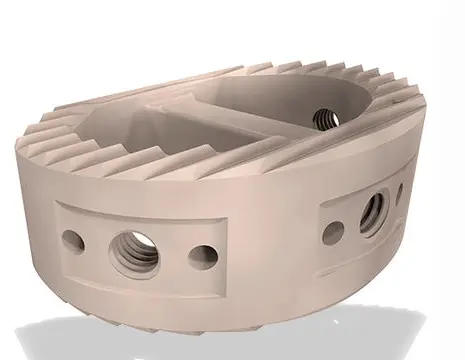
2: Medical PEEK Spinal Implant (Melting & Poor Finish)
- Challenge: Client used steel feeds/speeds → PEEK melting, Ra=0.8μm finish, 12% scrap.
- Zorapid Solution: PEEK‑specific G‑code + ultra‑low RPM (2,500) + low feed (400mm/min), dry cutting.
- Result: No melting, Ra=0.18μm mirror finish, 0% scrap, FDA‑compliant
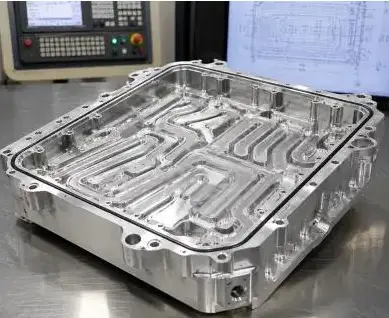
3: Automotive 7075 Aluminum EV Housing (Cycle Time & Tolerance)
- Challenge: Generic G‑code → 18‑minute cycle time, ±0.03mm tolerance, warping.
- Zorapid Solution: Adaptive clearing G‑code + high‑speed feeds/speeds (Vc=600m/min, F=4,000mm/min), stress‑relieved fixtures.
- Result: 12‑minute cycle time (33% faster), ±0.005mm tolerance, no warping, IATF 16949 compliant.
Key Applications for Precision G‑Code & Feeds/Speeds
Aerospace
- Turbine components (Inconel 718)
- Structural brackets (7075 aluminum)
- Landing gear parts (titanium)
- Satellite components (carbon fiber)Needs: ±0.005mm tolerance, heat resistance, high strength‑to‑weight.
Medical Devices
- Implants (titanium, PEEK)
- Surgical instruments (316L stainless)
- Diagnostic equipment housings (6061 aluminum)Needs: Biocompatibility, Ra ≤ 0.2μm finish, zero contamination.
Automotive (Including EV)
- EV battery housings (7075 aluminum)
- Powertrain gears (4140 steel)
- Suspension components (titanium)
- Sensor housings (6061 aluminum)Needs: High volume, ±0.01mm tolerance, durability.
General Precision Machining
- Mold inserts (420 stainless)
- Robotics components (6061 aluminum)
- Semiconductor parts (PEEK, aluminum)Needs: Complex geometries, tight tolerances, consistent quality.
Delivery Speed: Fast, Optimized Programs for Critical Timelines
We know your projects can’t wait. Our streamlined process delivers:
- G‑Code Only (Existing CAD): 24–48 hours (simple to complex programs)
- Program + Simulation: 3–5 days (with Vericut validation)
- Full Turnkey (CAD to First Part): 7–10 days (including setup & testing)
- Rush Jobs: Same‑week delivery (critical aerospace/medical projects)
Why we’re faster: 24/7 programming team, pre‑built material libraries, automated simulation, and zero rework (thanks to our 99.5% error‑free rate).
Industry Whitepaper: G‑Code & Feeds/Speeds Trends 2026–2027
Key Trends Shaping CNC Programming
- AI‑Optimized Feeds/Speeds: AI algorithms will auto‑adjust parameters in real time → 20% longer tool life, 15% faster cycles.
- 5‑Axis G‑Code Standardization: More shops will adopt modular 5‑axis code → reduced programming time, consistent quality.
- Cryogenic Cooling Mainstream: For Inconel/titanium, cryogenic cooling will become standard → 3–4× tool life improvement.
- G‑Code Simulation Mandatory: 80% of precision shops will require simulation before cutting → 90% reduction in crash/scrap risk.
- Material‑Specific Programming: Generic charts will be replaced with material‑specific libraries → higher quality, lower costs.
Critical Industry Challenges
- Skill Gap: Few programmers master both G‑code and advanced feeds/speeds for tough materials.
- Time Pressure: Clients demand faster programming and shorter lead times.
- Quality Expectations: Aerospace/medical clients require ±0.005mm consistency and full traceability.
Zorapid’s Position
We’re the leading precision CNC programming partner for aerospace, medical, and automotive OEMs. We’re investing in AI‑driven programming tools, cryogenic cooling technology, and 5‑axis training to solve the industry’s biggest challenges.
Conclusion
G‑code isn’t just “code”—it’s the blueprint for precision. Feeds and speeds aren’t just “numbers”—they’re the difference between profit and loss, quality and scrap.
Most shops use generic code and guess at parameters. At Zorapid, we engineer every line of G‑code and calculate every feed/speed value—tailored to your material, tool, machine, and tolerance requirements.
We master the unmachinable materials, deliver ±0.005mm consistency, and optimize for both speed and precision. Whether you’re programming an Inconel turbine bracket, a PEEK spinal implant, or an EV aluminum housing—Zorapid is your CNC programming partner.
Ready to stop guessing and start winning with G‑code and feeds/speeds? Contact us today for a free program review and feed/speed optimization.
FAQ
What’s the biggest mistake new programmers make with G‑code?
Not simulating programs before running them—this causes 70% of crashes and scrap. Always use Vericut or Mastercam Simulation.
How do I choose the right feed per tooth (fz) for my material?
Start with our material‑specific cheat sheet (Section 7). For hard materials (Inconel, stainless), use lower fz (0.15–0.25mm/tooth). For soft materials (aluminum), use higher fz (0.2–0.5mm/tooth).
Can I use the same feeds/speeds for roughing and finishing?
No—roughing needs higher feeds/moderate RPM for speed; finishing needs lower feeds/higher RPM for surface finish. Adjust by ±10–30% (Section 5).
What’s the best way to extend tool life for Inconel?
Cryogenic cooling + lower cutting speed (60–80m/min) + balanced feed per tooth (0.15–0.2mm/tooth). This reduces heat and tool wear by 70%.
Do I need different G‑code for 3‑axis vs. 5‑axis machines?
Yes—5‑axis requires additional commands (e.g., G68 for coordinate rotation) and different tool path strategies. We specialize in both.
How much does Zorapid charge for G‑code programming?
Pricing starts at $200 for simple 3‑axis programs and scales based on complexity (5‑axis, material, part size). Free quote and program review available.
Can Zorapid optimize my existing G‑code for better performance?
Absolutely—we’ll review your current program, tweak feeds/speeds, fix inefficiencies, and reduce cycle time by 15–30%. Free of charge for first review.
What’s the difference between G41 and G42 cutter compensation?
G41 = left compensation (tool path offset to the left of the cut direction); G42 = right compensation (offset to the right). Use G41 for most milling operations.