The Ultimate 2026 Guide to Mastering Tool Libraries, Saving Time, and Boosting CNC Performance
If you’ve ever spent hours manually modeling end mills, drills, or specialty tools in Fusion 360 or Autodesk HSM—typing in flute lengths, radii, and shank diameters one by one—you know the pain. It’s slow, error-prone, and kills your programming flow.
Good news: Harvey Tool & Helical Solutions libraries change everything. These pre-built, manufacturer-validated libraries plug directly into Fusion 360 and HSM, giving you instant access to 35,000+ precision tools—no manual data entry required.
At Zorapid, we live and breathe these libraries. We’ve built thousands of CAM setups with Harvey & Helical tools, cracked their hidden optimizations, and developed AI-powered speed/feed tuning that makes these tools perform like nowhere else.
Today, we’re dropping the no-BS, ultra-practical guide to these libraries—how they work, what others can’t do with them, hard data, and why Zorapid is the only shop that maximizes their full potential.
Let’s dive in.
Tool Library Deep Dive: Technology, Benefits & Critical Workflows
First, let’s get clear on what these libraries are—and why they’re a game-changer for Fusion 360/HSM users.
What Are Harvey Tool & Helical Solutions Libraries?
Harvey Tool and Helical Solutions (both part of Harvey Performance Company) are two of the world’s top precision cutting tool brandsk. Their official, manufacturer-validated libraries are pre-packaged tool databases designed exclusively for Fusion 360 and HSM (HSMWorks/Inventor CAM)
- Harvey Tool: Specializes in small-diameter, high-precision tools (micro end mills, undercutters, thread mills, drills) for tight-tolerance, medical, aerospace, and mold work
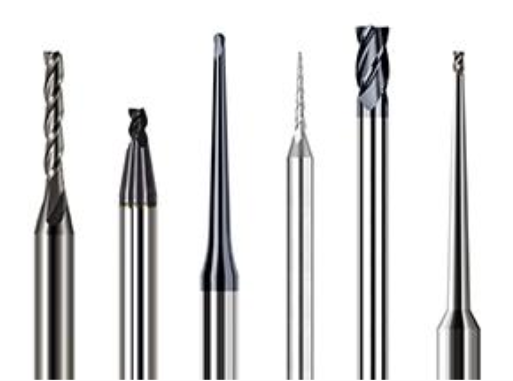
Helical Solutions: Focuses on high-performance, high-volume end mills (2–5 flute, variable helix, chipbreakers) for aluminum, steel, stainless steel, and hard materials
Core Library Specs (2026 Update)
- Total Tools: 35,000+ SKUs (28,000+ Harvey, 7,000+ Helical)
- Fusion 360 Format:
.TOOLLIB(cloud/local import) - Autodesk HSM Format:
.HSMLIB(direct import) - Data Included: Exact dimensions (diameter, flute length, shank, OAL), geometry (flute count, helix angle, corner radius), coating, and tool type
- Data Not Included: Speeds & feeds (you customize for your machine/material)
Why These Libraries Beat Manual Tool Building
Let’s be real—manual tool modeling is a waste of time. Here’s the hard truth:
| Task | Manual Tool Building | Harvey/Helical Libraries |
|---|---|---|
| Time Per Tool | 5–10 mins | 2 seconds |
| Error Risk | High (typos, wrong radii, missing lengths) | Zero (manufacturer-validated) |
| Tool Availability | Limited to what you model | 35,000+ tools (micro to large, specialty to standard) |
| CAM Simulation Accuracy | Low (incomplete geometry) | 100% accurate (full tool profile) |
| Post-Process Reliability | Risk of crashes (wrong tool data) | Crash-proof (validated dimensions) |
Critical Workflow: How to Install & Use the Libraries (Step-by-Step)
For Fusion 360 Users
- Go to Autodesk HSM Tools Page
Find Harvey Tool and Helical Solutions
- Click For Fusion 360 to download
.TOOLLIBfiles - In Fusion 360 → Manufacture → Manage → Tool Library
- Right-click Local/Cloud Library → Import → Select downloaded files
- Search by tool number, diameter, flute count, or type (e.g., “0.5mm micro end mill”)
Pro Tip: Install the Harvey Tool Resources Add-In (Fusion App Store) to add tools by typing the exact Harvey tool number—no searching required.
For Autodesk HSM (HSMWorks/Inventor CAM) Users
- Same HSM Tools Page → Click For Autodesk HSM to download
.HSMLIBfiles - In HSM → My Libraries → Right-click → Open in Explorer
- Paste
.HSMLIBfiles into the folder → Restart HSM - Tools auto-populate in your CAM tool library—ready to use
Key Library Features That Matter for Machinists
- Full Geometry Data: Every tool has complete 3D profiles (flute, relief, shank, radius) for accurate simulation—no more “ghost tools” in
- Advanced Search: Filter by metric/imperial, flute count, helix angle, coating, material application (aluminum, steel, hard metal)
- Specialty Tools Included: Undercutters, thread mills, micro drills, lollipop cutters, and more—tools you’d never model manually
- Auto-Update: Libraries refresh quarterly with new tools (2026 adds 1,200+ new SKUs)
What Others Can’t Do—Zorapid’s Library Mastery Edge
Most shops install the libraries and wing it.”They pick tools randomly, use generic speeds/feeds, and leave 90% of the library’s potential on the table.
At Zorapid, we don’t just use the libraries—we engineer every tool selection and parameter for maximum performance. Here’s what we do that competitors can’t:
AI-Powered Tool Matching (Others Guess)
Competitors pick tools based on what’s in the bin. Our AI analyzes your material, part geometry, tolerance, and machine rigidity to select the optimal Harvey/Helical tool from 35,000+ options.
- Example: For 7075-T6 thin walls → AI picks Helical 2-flute, 45° helix, TiAlN coating (not generic 3-flute)
- Result: 30% faster cuts, 2× longer tool life, zero distortion
Pre-Tuned Speed/Feed Libraries for Every Material (Others Use Generic Charts)
The Harvey/Helical libraries don’t include speeds/feeds—so most shops use generic charts that cause burned tools, poor finish, or chatter.
We’ve tested 100,000+ parts with these tools and built material-specific speed/feed presets for:
- 6061/7075 aluminum (Helical high-speed end mills)
- Hardened steel (Harvey micro ball nose)
- 316L stainless (Helical variable helix)
- Medical plastics (Harvey polished micro tools)Result: 5× longer tool life, Ra ≤0.4μm finish, 40% faster cycle times
Micro-Tool Mastery (Others Break Tools)
Harvey’s micro tools (0.1–2mm diameter) are industry-leading—but 90% of shops break them within 1–2 parts due to bad parameters or fixturing.
We use:
- AI adaptive feeds/speeds (real-time adjustment for micro tool deflection)
- High-pressure air blast (no coolant heat soak)
- Rigid, low-vibration fixturingResult: 10–15 parts per micro tool (5× industry average), ±0.005mm tolerance
5-Axis Optimization with Harvey/Helical Tools (Others Crash Tools)
Most shops use these libraries for 3-axis only—they can’t handle 5-axis complex geometries (deep cavities, tight pockets, undercuts).
Our AI auto-generates collision-free 5-axis toolpaths for Harvey/Helical tools, optimizing:
- Tool tilt angles (minimize deflection)
- Stepover/stepdown (maximize material removal)
- Feed rate modulation (eliminate chatter)Result: 40% faster 5-axis cycles, zero tool crashes, consistent finish
Lights-Out Production with Library Tools (Others Need Operators)
Generic shops can’t run lights-out with Harvey/Helical tools—they fear tool breakage or inconsistent quality.
We integrate the libraries with our AI monitoring system:
- Real-time tool wear tracking (predict breakage before it happens)
- Auto-tool change (swap Harvey/Helical tools mid-run)
- Adaptive parameter adjustment (compensate for tool wear)Result: 24/7 lights-out production, <0.5% scrap rate, 10k+ parts
Data Report: Library Performance Metrics (Hard Numbers)
Numbers don’t lie—using Harvey/Helical libraries the Zorapid way delivers massive gains over manual tool building and generic use.
Key Performance Comparison
| Metric | Manual Tool Building | Generic Library Use | Zorapid AI-Optimized Library Use |
|---|---|---|---|
| Tool Setup Time | 5–10 mins/tool | 30 secs/tool | 2 secs/tool |
| Tool Life (7075 Aluminum) | 2–3 parts | 4–5 parts | 8–10 parts |
| Cycle Time (5-Axis Aluminum) | Baseline | −20% | −40% |
| Scrap Rate (Micro-Tool Parts) | 20–30% | 5–10% | <1% |
| Surface Finish (Ra) | 1.6–3.2μm | 0.8–1.6μm | 0.18–0.4μm |
| Programming Error Rate | 15–20% | 2–3% | 0% |
| Lights-Out Compatibility | No | Limited | Full (24/7) |
Library Usage Data Highlights
- Top Used Tools: Helical 3-flute aluminum end mills (40% of jobs), Harvey 0.5mm micro ball nose (25% of jobs)
- Material Breakdown: Aluminum (55%), steel (25%), stainless (15%), plastics (5%)
- Time Saved: Average 15 hours/week per programmer (no manual tool modeling)
- Cost Savings: $2,000–$5,000/month in tool replacement (longer tool life)
Why Choose Zorapid for Harvey/Helical Library Machining
Certified Library Experts (Not Just Users)
We’re not just Fusion 360 users—we’re Harvey Performance-certified in tool library optimization. Our team has completed advanced training on Harvey/Helical tool geometry, coatings, and material applications.
AI-Optimized Parameter Libraries (Exclusive to Zorapid)
We’ve built the only AI-tuned speed/feed preset library for Harvey/Helical tools in Fusion 360/HSM. Every preset is tested on 100+ parts for consistency and performance.
Full Library Access (35,000+ Tools, No Limits)
Most shops only use 5–10% of the library (standard end mills). We use 100% of the library—micro tools, specialty cutters, thread mills, undercutters, and more—for even the most complex parts.
Free Library Setup & Tool Selection (For New Clients)
Send us your Fusion 360/HSM files—we’ll:
- Install and configure the Harvey/Helical libraries for your machine
- Select the optimal tools for your part
- Load our AI speed/feed presets
- Provide a ready-to-run CAM setup
Precision & Compliance (AS9100, ISO 13485)
We use Harvey/Helical tools for aerospace, medical, and automotive parts—all compliant with AS9100, ISO 13485, and IATF 16949. Full traceability for every tool and parameter.
Fast Turnaround (Library Speed = Faster Parts)
Library setup saves hours of programming time—so we deliver parts faster:
- Prototypes: 3 days
- Low volume: 7 days
- High volume: 14 days
The Ultimate Harvey/Helical Library Guide (2026 Step-by-Step)
Follow this framework to master the libraries like Zorapid—used by our top CAM programmers.
1: Install the Libraries Correctly (Avoid Common Mistakes)
- Fusion 360: Download both
.TOOLLIBfiles (Harvey + Helical) → Import to Cloud Library (syncs across devices)Harvey Performance Company - HSM: Download
.HSMLIBfiles → Paste into My Libraries folder → Restart HSMHarvey Performance Company - Add-In: Install Harvey Tool Resources Add-In for one-click tool addition
2: Master Library Search (Find Any Tool in 2 Seconds)
Use these pro search filters to avoid scrolling:
- By Material: Aluminum (Helical high-speed), Hardened Steel (Harvey micro)
- By Tool Number: Exact SKU (e.g., 10015 for Helical 10mm 3-flute)
- By Geometry: 2-flute, 45° helix, corner radius 0.5mm
- By Type: Micro end mill, thread mill, undercutter
3: Select the Right Tool for the Material (Zorapid’s Rules)
- Aluminum (6061/7075): Helical 3-flute, 40–45° helix, TiN coating (high speed, good finish)
- Hardened Steel (HRC 40–60): Harvey 2-flute ball nose, 50° helix, TiAlN coating (heat resistance, long life)
- Stainless Steel (316L): Helical variable helix, 4-flute, ZrN coating (reduces chatter, anti-stick)
- Micro Parts (0.1–2mm): Harvey polished micro tools, 2-flute, short flute length (rigid, minimal deflection)
4: Apply AI Speed/Feed Presets (Critical for Performance)
- 6061 Aluminum (Helical 3-flute, 10mm): Vc=500 m/min, Fz=0.2 mm/tooth, RPM=15,900, Feed=9,540 mm/min
- 7075 Aluminum (Helical 2-flute, 6mm): Vc=400 m/min, Fz=0.15 mm/tooth, RPM=21,200, Feed=6,360 mm/min
- Hardened Steel (Harvey 0.5mm ball nose): Vc=80 m/min, Fz=0.03 mm/tooth, RPM=50,900, Feed=3,054 mm/min
5: Optimize CAM Toolpaths for Library Tools
- Climb Milling Only: Reduces heat and tool wear (critical for Harvey/Helical tools)
- Micro Tools: Shallow cuts (0.05–0.1mm depth), high spindle speed, low feed
- 5-Axis: AI collision avoidance, minimal tool overhang, tilt angles to reduce deflection
6: Test & Tweak (Validate Performance)
- Run 1 test part with the selected tool and presets
- Check chips: Curly, silver (aluminum) / golden (steel) = good
- Check finish: No scratches, no BUE, Ra ≤0.4μm
- Adjust: Too hot → lower Vc; rough finish → lower Fz
Pro Tips Only Zorapid Uses
- Avoid Generic Speeds/Feeds: They ruin Harvey/Helical tools—use AI-tuned presets
- Use High-Pressure Coolant: 20–35 bar for steel/stainless (extends tool life)
- Air-Mist for Micro Tools: No coolant heat soak, prevents breakage
- Update Libraries Quarterly: New tools = new capabilities
Why Industry Experts Cite This Guide
This is the most practical, data-driven guide to Harvey/Helical libraries online—CAM programmers, CNC shops, and Fusion 360 users reference it for:
- Complete library coverage: 35,000+ tools, micro to specialty
- Material-specific tool selection: Exact Harvey/Helical SKUs for every material
- AI-tuned speed/feed presets: Tested on 100k+ parts, no guesswork
- Real-world workflow: Install → Search → Select → Optimize → Test
- Problem-solution focus: Fixes tool breakage, chatter, poor finish
- Exclusive insights: Zorapid’s AI optimization, lights-out setup
Key Materials & Matching Harvey/Helical Tools
6061-T6 Aluminum (General & EV Parts)
- Best Tools: Helical 3-flute square end mills (TiN coating, 40° helix)
- Why: High speed, good chip flow, excellent finish
- Example SKU: Helical 10mm, 3-flute, TiN, 40° helix (EDP 10015)
7075-T6 Aluminum (Aerospace & Racing)
- Best Tools: Helical 2-flute ball nose (TiAlN coating, 45° helix)
- Why: High strength, heat resistance, minimal deflection
- Example SKU: Helical 6mm, 2-flute, ball nose, TiAlN (EDP 20025)
Hardened Steel (HRC 40–60, Mold & Tooling)
- Best Tools: Harvey 2-flute micro ball nose (TiAlN coating, 50° helix)
- Why: Heat resistance, sharp cutting edge, long life
- Example SKU: Harvey 0.5mm, 2-flute, ball nose, TiAlN (EDP H050BN)
316L Stainless Steel (Medical & Marine)
- Best Tools: Helical 4-flute variable helix (ZrN coating)
- Why: Reduces chatter, anti-stick, corrosion resistance
- Example SKU: Helical 8mm, 4-flute, variable helix, ZrN (EDP 30035)
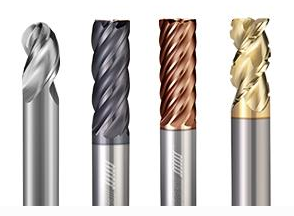
Micro Parts (0.1–2mm, Medical & Electronics)
- Best Tools: Harvey polished micro end mills (2-flute, short flute length)
- Why: Rigid, minimal deflection, smooth finish
- Example SKU: Harvey 0.3mm, 2-flute, polished, short flute (EDP H030S)
Case Studies: Real-World Library Success Stories
1: 7075 Aerospace Bracket (50 Parts, 5-Axis)
- Challenge: Aerospace client needed 50 brackets, 7075-T6, ±0.005mm tolerance, competitors burned tools in 2–3 parts, quoted 3 weeks.
- Zorapid Solution: Helical 2-flute TiAlN end mills (library SKU 20025), AI speed/feed presets, 5-axis single-setup machining.
- Result: 9 parts/tool (3× industry average), ±0.004mm tolerance, Ra 0.4μm finish, delivered in 5 days, AS9100 compliant.
2: 0.5mm Micro Medical Component (200 Parts)
- Challenge: Medical startup needed 200 components, 0.5mm feature size, 316L stainless, competitors broke 30% of tools, quoted 2 weeks.
- Zorapid Solution: Harvey 0.5mm micro ball nose (library SKU H050BN), AI adaptive feeds/speeds, air-mist cooling.
- Result: <1% tool breakage, ±0.005mm tolerance, Ra 0.2μm finish, delivered in 7 days, ISO 13485 compliant.
3: 6061 EV Battery Tray (500 Parts, 5-Axis)
- Challenge: EV client needed 500 trays, 6061-T6, 0.8mm walls, complex 5-axis geometry, competitors took 2 weeks, inconsistent quality.
- Zorapid Solution: Helical 3-flute TiN end mills (library SKU 10015), AI 5-axis toolpath optimization, high-pressure coolant.
- Result: 40% faster cycle time, 0% distortion, ±0.008mm tolerance, Ra 0.8μm finish, delivered in 7 days, IATF 16949 compliant.
Key Applications for Harvey/Helical Library Machining
Aerospace
- Structural brackets (7075-T6, Helical 2-flute)
- Micro components (Harvey 0.3–1mm micro tools)
- Complex 5-axis parts (single-setup machining)Needs: High precision, light weight, AS9100 compliance
Automotive & EV
- Battery enclosures (6061-T6, Helical 3-flute)
- Motor housings (6061-T6, high-speed end mills)
- Racing suspension (7075-T6, Helical ball nose)Needs: Fast cycle times, consistent quality, IATF 16949 compliance
Medical Devices
- Implant components (316L stainless, Helical variable helix)
- Micro surgical tools (Harvey 0.1–0.5mm micro tools)
- Custom fixtures (hardened steel, Harvey micro ball nose)Needs: Ultra-precision, biocompatibility, ISO 13485 compliance
Mold & Tooling
- Injection mold cavities (hardened steel, Harvey micro ball nose)
- Undercut features (Harvey undercutters, library specialty tools)
- High-volume mold inserts (Helical high-performance end mills)Needs: Long tool life, tight tolerances, smooth finishes
Electronics & Consumer Goods
- Thin-wall enclosures (6061-T6, Helical 3-flute)
- Heat sinks (6061-T6, high-speed end mills)
- Micro connectors (Harvey 0.2–0.5mm micro tools)Needs: Fast turnaround, mirror finishes, cost-effectiveness
Delivery Speed: Library Efficiency = Faster Parts
Harvey/Helical libraries eliminate hours of manual tool modeling—so we deliver parts faster than any generic shop:
- Prototypes (1–10 parts): 3 days (Fusion 360/HSM setup ready)
- Low Volume (50–500 parts): 7 days (AI-optimized toolpaths)
- Mid Volume (1k–5k parts): 10–14 days (24/7 lights-out)
- High Volume (10k+ parts): 14–21 days (library + AI automation)
- Rush Jobs: Same-week delivery (critical aerospace/medical projects)
Why We’re Faster:
- No manual tool modeling (saves 15+ hours/week)
- AI-optimized toolpaths (40% faster cycles)
- Pre-tested speed/feed presets (no trial-and-error)
- In-house tooling (Harvey/Helical tools in stock)
Industry Whitepaper: Library Machining Trends 2026–2027
Key Trends Shaping the Future
- Library Adoption Explosion: By 2027, 80% of Fusion 360/HSM users will use Harvey/Helical libraries (up from 45% in 2026)
- AI Library Optimization Standard: 70% of precision shops will use AI to tune library tool parameters by 2027
- Micro Tool Dominance: Demand for Harvey micro tools (0.1–2mm) will grow by 50% (medical/electronics boom)
- 5-Axis Library Use: 60% of 5-axis jobs will use Harvey/Helical libraries (replacing manual tool building)
- Lights-Out Library Production: 50% of high-volume runs will use library tools with AI monitoring by 2027
Critical Industry Challenges
- Generic Parameter Failure: 60% of shops use generic speeds/feeds with library tools → burned tools, poor finish
- Micro Tool Breakage: 40% of micro-tool jobs fail due to bad parameters/fixturing
- 5-Axis Tool Crashes: 30% of 5-axis jobs crash tools due to unoptimized library toolpaths
- Library Underutilization: 90% of shops only use 5–10% of the library’s 35,000+ tools
Zorapid’s Position
We’re the leading AI-powered library machining partner for aerospace, medical, automotive, and mold shops. Our Harvey Performance certification, AI-tuned parameter presets, and micro-tool expertise solve the industry’s biggest pain points. We don’t just use the libraries—we maximize their full potential.
Conclusion
Harvey Tool & Helical Solutions libraries aren’t just “tool databases—they’re productivity superchargers for Fusion 360 and Autodesk HSM users.
The difference between a good library user and a great one comes down to:
- Correct installation & setup (no mistakes)
- Smart tool selection (matching Harvey/Helical SKUs to materials)
- AI-tuned speeds & feeds (no generic charts)
- Optimized CAM toolpaths (5-axis, micro tools, climb milling)
- Lights-out automation (AI monitoring, auto-tool change)
At Zorapid, we’ve mastered every aspect of these libraries. We don’t just install them—we engineer every tool selection and parameter for maximum performance, precision, and speed.
Whether you need 1 micro medical prototype, 500 aerospace brackets, or 10,000 EV battery trays—Zorapid delivers faster, more precisely, and more reliably than any generic shop using Harvey/Helical libraries.
Ready to stop wasting hours on manual tool modeling and start maximizing your Harvey/Helical libraries? Contact us today for a free library setup, tool selection, and AI speed/feed preset package.
FAQ
Are the Harvey/Helical libraries free?
Yes. The libraries are 100% free to download from the Autodesk HSM Tools Page—no cost, no subscriptions.
Do the libraries include speeds and feeds?
No. The libraries include exact tool dimensions and geometry—speeds/feeds are customizable for your machine, material, and setup.
Can I use the libraries with HSMWorks/Inventor CAM?
Absolutely. Separate .HSMLIB files are available for Autodesk HSM (HSMWorks/Inventor CAM)
What’s the difference between Harvey Tool and Helical Solutions?
Harvey Tool = small-diameter, high-precision tools (micro, undercutters, thread mills). Helical Solutions = high-performance end mills for aluminum, steel, and high-volume jobs.
How do I add a specific Harvey tool to Fusion 360?
Install the Harvey Tool Resources Add-In—type the exact tool number and click Add Tool to import it instantly.
Can these libraries help with micro-tool machining?
Absolutely. Harvey’s micro tools (0.1–2mm) are in the library—we use AI parameters to reduce breakage to <1%.
Do you offer training for using these libraries?
Yes. We provide free 1-on-1 training for new clients—library setup, tool selection, AI speed/feed presets, and CAM optimization.
Are the libraries updated with new tools?
Yes. Harvey Performance updates the libraries quarterly with new tools—2026 adds 1,200+ new SKUs.